
How to Wire a Push Button to the ERA-UTX Universal Transmitter
Wire a non-lighted doorbell button or a wired door contact to the ERA-UTX universal transmitter: which terminals to use, how to pair and mount it, and why it helps range.
On This Page
- What the ERA-UTX is
- Why wire a button to a wireless transmitter?
- What you need
- Which terminals to use
- How to wire the button
- Connecting more than one device
- Pairing the ERA-UTX to a receiver
- Mounting the transmitter
- Battery and specifications
- Extending the range of an ERA system
- Frequently asked questions
- Can I use a lighted doorbell button?
- Does the wire polarity matter?
- Will the ERA-UTX's own button still work after I wire a button to it?
- Do I need a doorbell transformer?
- Can I connect the ERA-UTX to a wired doorbell that's still working?
Quick answer: the ERA-UTX universal transmitter has three screw terminals at the bottom of its case: NO, COM (the center terminal) and NC. To use a standard wired doorbell button, run two doorbell wires from the button to the NO and COM terminals. Polarity does not matter. When the button is pressed, the ERA-UTX sends its wireless signal to your ERA receiver, exactly as if you had pressed its own gray button. Use a non-lighted button only; a lighted button will drain the transmitter's battery.
What the ERA-UTX is
The ERA-UTX is the universal transmitter for the Safeguard Supply ERA Series. When it is triggered, it sends a radio signal up to 4,000 ft, line of sight, to any ERA receiver: the ERA-DCRX desktop receiver, the ERA-RXPG plug-in strobe receiver or the ERA-VPRX portable receiver. It must be paired with an ERA receiver to work.
It can be triggered three ways, and all three can be used at the same time:
- Its own push button. Press the gray center button. Use it as a doorbell button or a panic button.
- Its magnetic contact. Mount the transmitter on a door or window frame and the included magnet on the door. Opening the door triggers it. The gap between the magnet and the transmitter must be less than ½ inch.
- Its wired input terminals. Connect any device with a normally open (N/O) or normally closed (N/C) contact: a wired doorbell button, a wired door or window contact, or another detector with a dry contact output.
This article covers the third method.
Why wire a button to a wireless transmitter?
- To get through walls, steel and concrete. The ERA-UTX is rated up to 4,000 ft, but thick concrete, steel doors and metal buildings can weaken any radio signal. If you mount a wired button outside and the ERA-UTX just inside, the signal no longer has to pass through the exterior wall or a steel door. That often solves a range problem without changing receivers.
- To keep the look of a traditional doorbell button. Visitors see a normal wired button at the door, while the alert travels wirelessly to an office, warehouse or second building.
- To reuse wiring you already have. If a door already has a wired doorbell button or a wired door contact, connect those wires to the ERA-UTX and the ERA receiver becomes your chime.
- To protect the transmitter. The button outside takes the weather and the wear; the transmitter stays indoors.
What you need
- An ERA-UTX universal transmitter, with its CR2 lithium battery installed
- A compatible ERA receiver, already powered and working
- A non-lighted wired doorbell push button (or a wired door/window contact)
- Two-conductor doorbell wire, such as BELLWIRE 20AWG 2-lead doorbell wire
- A small Phillips screwdriver and a wire stripper
Which terminals to use
| Device you are connecting | How its contact works | Connect to |
|---|---|---|
| Standard doorbell push button | Normally open: closes only while pressed | NO and COM |
| Device with a normally open (N/O) output | Closes when it triggers | NO and COM |
| Device with a normally closed (N/C) output | Opens when it triggers | NC and COM |
COM is always the center terminal. If you are unsure whether a wired door contact is normally open or normally closed, check its label or instructions before you connect it.
How to wire the button
- Open the case. Remove the silicone plugs from the screw wells on the back, remove the four screws, and lift the top half of the case off the bottom half.
- Check the battery. Make sure the CR2 lithium battery is installed in the holder.
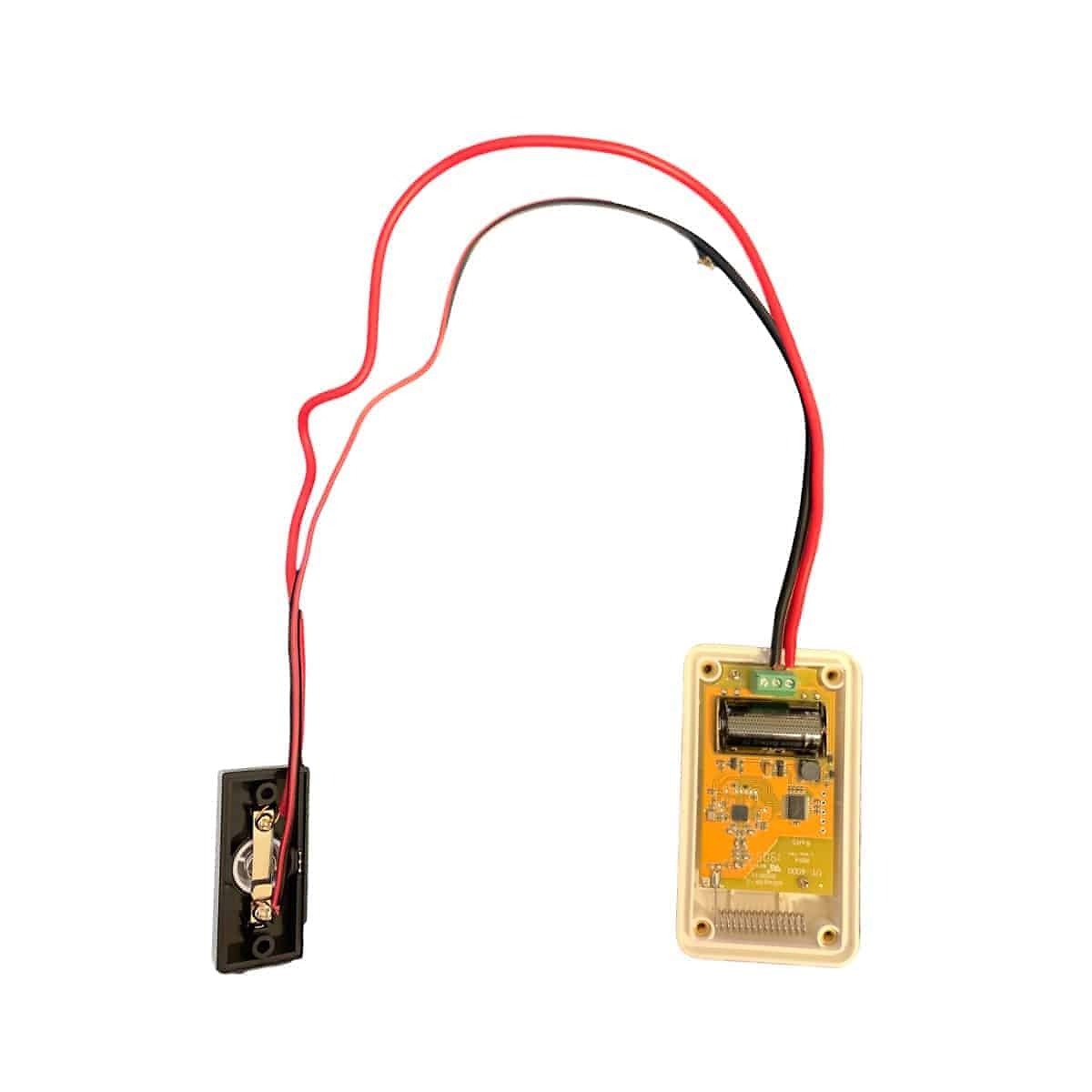
- Find the terminals. They are at the bottom of the case. COM is the center terminal.
- Feed the wires in. Pass the two wires from the button through the silicone gasket at the bottom of the case. The gasket keeps moisture and dust out.
- Connect the wires. For a doorbell button, connect one wire to NO and the other to COM. Polarity does not matter. Tighten the terminal screws.
- Test before you close it up. Press the wired button. The red LED under the gray button should light for about 2 seconds, and your ERA receiver should sound. If it does not, check that the transmitter is paired (below) and that both wires are tight.
- Close the case and put the four screws back. If the transmitter will be outdoors, put the silicone plugs back in the screw wells.
Connecting more than one device
- Several normally open devices (for example, two doorbell buttons at two doors): wire them in parallel to NO and COM. Any one of them will trigger the transmitter.
- Several normally closed devices: wire them in series to NC and COM. Opening any one of them will trigger the transmitter.
- Mixing them: the N/O and N/C inputs can be used at the same time, along with the ERA-UTX's own push button and magnetic contact.
Every device wired to one ERA-UTX shares that transmitter's signal, so they all play the same melody on the receiver. If you want each door to sound different, give each door its own ERA-UTX. Each ERA receiver works with up to 12 transmitters, and there is no limit to the number of receivers one transmitter can trigger.
Pairing the ERA-UTX to a receiver
Always pair and test the transmitter before you mount it.
- Make sure the battery is installed in the ERA-UTX.
- Make sure the receiver is powered up and working.
- Put the receiver in programming mode. Each receiver does this a little differently; see your receiver's manual.
- Press the gray center button on the ERA-UTX (or the wired button). The red LED should light for about 2 seconds.
- The receiver will signal that the transmitter has been paired. Follow the receiver's manual to choose a melody, pair another transmitter, or leave programming mode.
Mounting the transmitter
- Slide the mounting bracket off the back of the ERA-UTX.
- Screw the bracket to the wall with the two included screws, with the arrow on the bracket pointing up.
- Slide the transmitter onto the bracket.
- Mount it on the inside of the exterior wall where possible, so the wired button is the only part outside.
For door-contact and push-button mounting, see Mounting the ERA-UTX.
Battery and specifications
- Battery: CR2 lithium (included). Expect about 18-24 months; cold weather and frequent use shorten it.
- Low battery: the ERA-UTX tells the receiver when its battery is getting weak. How the receiver shows it depends on the receiver; see the receiver's manual.
- Range: up to 4,000 ft, line of sight
- Frequency: 433 MHz
- Size: 2 in W x 3.75 in H x 0.875 in D
- Operating temperature: -30°F to 120°F
- In the box: ERA-UTX, mounting bracket, CR2 lithium battery, double-sided tape, mounting screws and user manual
Extending the range of an ERA system
If a receiver is still out of range after moving the transmitter indoors, an ERA-DCRX receiver that is in range can pass the alert along to receivers farther away. Each hop can add up to another 4,000 ft, line of sight. There are two ways to do it, and the difference is the same one that decides how you wire the ERA-UTX: a plain contact or a powered connection.
- ERA-UTX on the ERA-DCRX C-form relay. The C-form relay is a plain contact that supplies no power, which is exactly what the ERA-UTX terminals expect. When the ERA-DCRX is triggered, its relay triggers the ERA-UTX, which sends the alert on to the next receiver. See connecting the ERA-UTX to the ERA-DCRX C-form relay.
- ERA-EXTX on an ERA-DCRX 12V DC output. The 12V DC outputs supply power when the receiver is triggered, so they use the ERA-EXTX doorbell extender, which is built for a powered circuit. See extending the ERA-DCRX range with the ERA-EXTX.
Either way, the first ERA-DCRX must be within range of the original transmitter and working correctly.
Frequently asked questions
Can I use a lighted doorbell button?
No. A lighted button draws a small current all the time, which will drain the ERA-UTX battery. Use a non-lighted button.
Does the wire polarity matter?
No. The button only opens or closes the circuit, so either wire can go on either terminal.
Will the ERA-UTX's own button still work after I wire a button to it?
Yes. The gray button, the magnetic contact and both wired inputs all work at the same time.
Do I need a doorbell transformer?
No. The ERA-UTX runs on its battery, and a plain doorbell button does not need power. Do not connect the ERA-UTX to a transformer.
Can I connect the ERA-UTX to a wired doorbell that's still working?
No. The ERA-UTX terminals are for a plain button or contact with no power on it. To keep your existing wired chime and add an ERA receiver, use the ERA-EXTX doorbell extender, which wires into a 5V-28V AC/DC doorbell circuit. If you are replacing the old chime entirely, disconnect the button from the transformer and wire it to the ERA-UTX on NO and COM.
Shop wired doorbell buttons or the business chime collection, or buy the ERA-UTX as a kit with a receiver in the ERA-UTDCR.
More in Wireless Doorbell FAQ
Browse the full FAQ category or continue with related answers from the same FAQ category.