
Using the Relays on the LRA-DCRX to Connect External Device
The LRA-DCRX receiver features a relay that may be used to integrate and activate an external device. For example, a strobe light, 12V DC output, or other devices may be configured to trigger when the relay on the receiver activates. Tips & Notes: The unit WILL NOT supply power to the external device. The external…
FAQ and compatibility answers
Use this answer together with the linked product categories below. Most FAQ topics here end in a specific part — a transformer, a chime, a push button, or a receiver — and each category page compares the options we stock.
Related Categories And Products
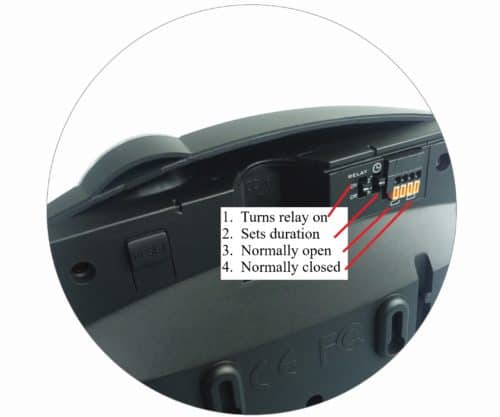
The LRA-DCRX receiver features a relay that may be used to integrate and activate an external device. For example, a strobe light, 12V DC output, or other devices may be configured to trigger when the relay on the receiver activates.
Tips & Notes:
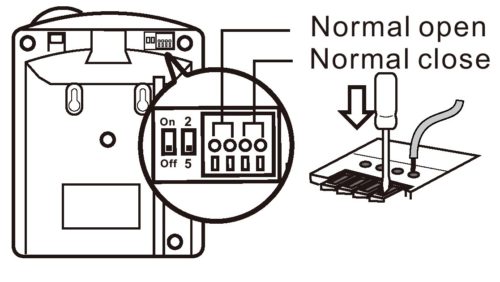
- The unit WILL NOT supply power to the external device. The external device must have a separate power supply.
- The relay ONLY works with Zone 4 on the receiver. For the relay to work, there must be a transmitter paired with Zone 4.
- The relay DOES NOT provide power.
- The relay may be set to normally open or normally closed.
- Ensure the relay is set to the “on” position./li>
- Set the duration of output to 2 seconds or 5 seconds.
In this example, we will wire a 12V DC siren to sound when the push button paired to Zone 4 is triggered.
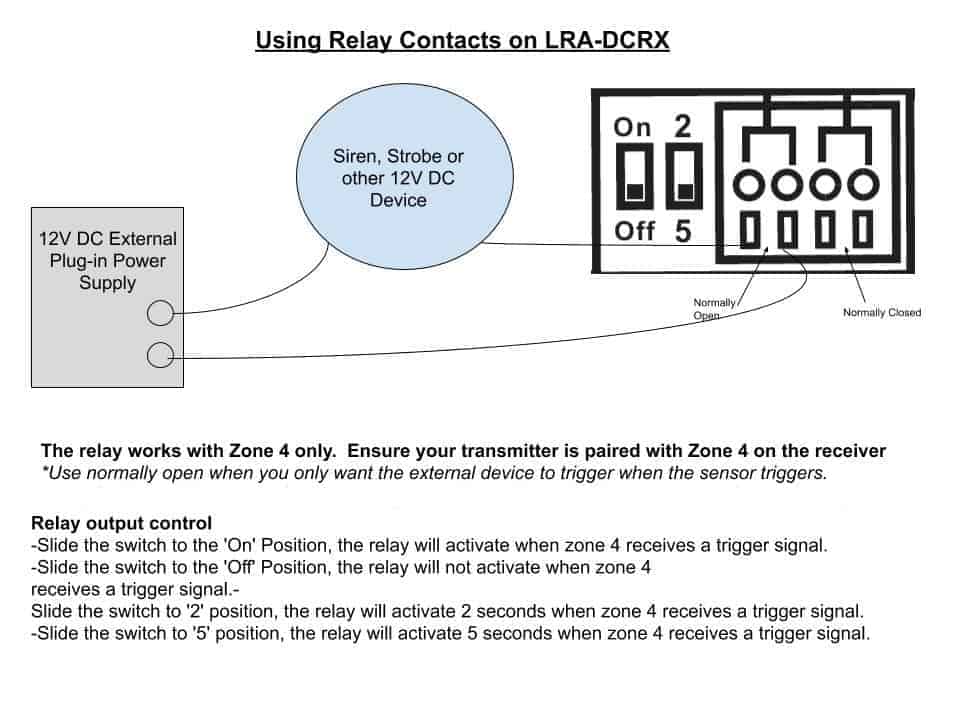
What you will need:
- A LRA transmitter (push button, door contact, etc.) paired to zone 4 of the LRA-DCRX receiver.
- 12V DC siren
- Extra wire (as needed)
- External power device used to power the 12V DC siren. In this example, we are using a 16.5 VAC /40VA Class II plugin transformer. Please make sure the power supply you use will supply the necessary power to the external device.
- Ensure the power supply is unplugged.
- Wire one wire of the siren into one of the “normally open” connectors on the back of the receiver (see image below).
- Wire the other wire of the siren to the plug-in transformer (see image below).
- Take a wire and connect one end to the other slot of the “normally open” relay.
- Take the other end of that same wire and connect it to the transformer (see image below).
- Plug in the transformer. Ensure the receiver is powered on–test.
More in LRA Product FAQ
Browse the full FAQ category or continue with related answers from the same FAQ category.