
There’s No Sound Coming From My LRA Receiver
Get a plain-language answer to there's no sound coming from my lra receiver, with setup notes, compatibility details, and links to related help and.
Short answer: This page explains there's no sound coming from my lra receiver in practical terms, with links to the products, setup guides, and troubleshooting steps that usually matter next.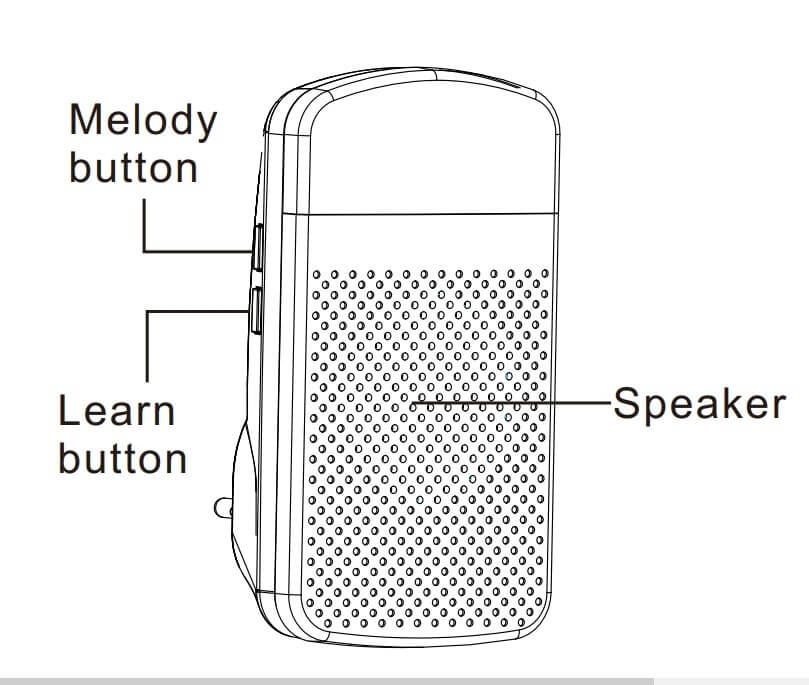
Ensure a “Sound” Mode is Selected for the Receiver
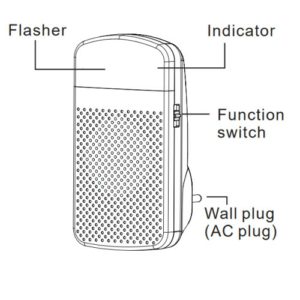
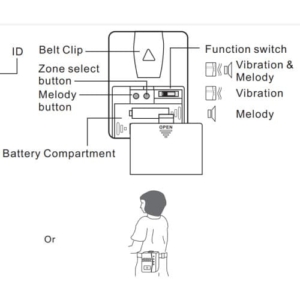
Check to ensure “sound” mode is turned on for the receiver. For each of the receivers, there are three modes of operation. For the LRA-DCRX and LRA-DCRXS the three operational modes are 1) sound only, 2) sound & flashing strobe, and 3) flashing strobe only. For the LRA-VPRX, the three operational modes are 1) vibration & sound, 2) vibration only, and 3) sound only. If you are not getting sound from any of these receivers, check to make sure you have a sound mode activated. * See the illustrations below to locate the operation mode selector switch.
Ensure Volume is Turned Up
Of the three receivers, the LRA-DCRX is the only one with a volume control knob. To access the volume control, open the front cover. Locate the volume knob/wheel, and turn to the right to ensure the volume is turned up.
More in LRA Product FAQ
Browse the full FAQ category or continue with related answers from the same FAQ category.