
How to Program a Transmitter to the LRA-DCRXS Receiver
Watch the video below that demonstrates how to program an LRA transmitter/sensor to the LRA-DCRXS Receiver. NOTE: The LRA-DCRXS has two zones. One transmitter/sensor may be programmed to a zone. Common practice is to select a different melody for each zone (if programming two transmitters/sensors) so you can determine what zone is triggered by the…
On This Page
Watch the video below that demonstrates how to program an LRA transmitter/sensor to the LRA-DCRXS Receiver.
NOTE: The LRA-DCRXS has two zones. One transmitter/sensor may be programmed to a zone. Common practice is to select a different melody for each zone (if programming two transmitters/sensors) so you can determine what zone is triggered by the sound/melody.
- Plug the LRA-DCRXS receiver into a standard wall outlet.
- Ensure the transmitter/sensor has new batteries in it.
- Hold down the “Learn” button on the LRA-DCRXS for approximately 3 seconds.
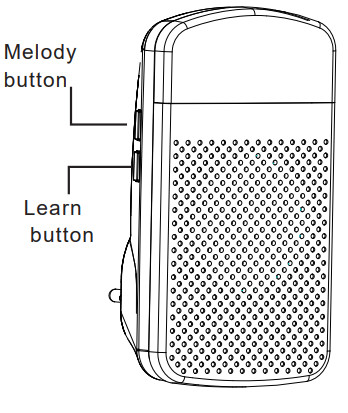
- After 3-seconds, a red LED should start flashing inside the strobe lens (the top part of the receiver). If the red LED is solid, please consult this FAQ document to “Erase Programming on the LRA-DCRXS.”
- Once the red LED is flashing, press the “Melody” button until you hear the sound or melody you want associated with the transmitter you are programming.
- Push the transmitter you want to program to the receiver.
- If both zones where empty prior to programming, after programming the first zone on the receiver, you should notice the red LED is flashing, but slower than it was for the previous zone. If you have another transmitter to program, scroll through the melodies again and then press/trigger the second transmitter when you find the melody you want for that zone.
Programming the LRA-DCRXS Receiver Video
More in LRA Product FAQ
Browse the full FAQ category or continue with related answers from the same FAQ category.