
Mounting the ERA-UTX
This document does not discuss programming the ERA-UTX but rather the physical mounting of the transmitter. You do not need the smaller magnetic if using a push button only. Mounting the ERA-UTX as a Push Button You can use the transmitter as a doorbell that activates when the center button is pressed. Mounting the ERA-UTX as…
This document does not discuss programming the ERA-UTX but rather the physical mounting of the transmitter. You do not need the smaller magnetic if using a push button only.
Mounting the ERA-UTX as a Push Button
You can use the transmitter as a doorbell that activates when the center button is pressed.
- Use a drill bit and two of the two included screws to mount the transmitter bracket. Make sure the arrow printed on the bracket is pointed up.
- If mounting outside, ensure the grey silicon grommets covering the screw holes are inserted.
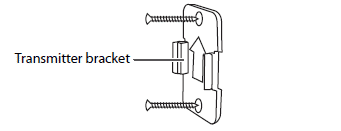
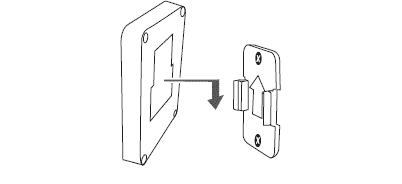
- Slide the transmitter down onto the bracket.
Mounting the ERA-UTX as a Door/Window Contact
The ERA-UTX may also be used as a magnetic door/window contact that triggers when the smaller magnet separates from the larger piece.
- Choose mounting locations where the magnetic contact (the smaller piece) is 1/2 inch or less from the push button (the large piece).
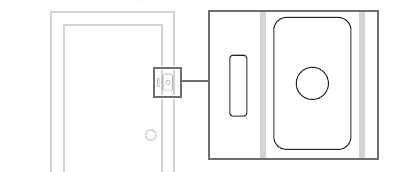
- Mount the magnetic contact with a drill and the two included screws, then snap the cover back on the magnet.
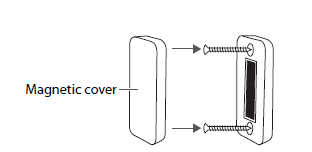
- Mount the transmitter bracket with the drill holes and two included screws. Make sure the arrow on the bracket is facing up.
- If you mount your transmitter outdoors, ensure the silicon grommets are plugged into the push button (the larger piece) to waterproof the casing.
- Slide the transmitter down onto the bracket.
More in Installation & Setup FAQ
Browse the full FAQ category or continue with related answers from the same FAQ category.