
Understanding Wireless Range: Published Specs vs. Real-World
Why Published Range Differs from Real-World Range
When shopping for wireless doorbells, entrance alerts, driveway alarms, and other long-range wireless products, you’ll notice every product lists a maximum wireless range—typically stated as “up to X,000 feet.” For example, the Dakota Alert DCPA-4K-PLUS Driveway Alarm lists a range of “up to 5,000 feet.”
It’s important to understand that these published ranges represent optimal laboratory conditions—essentially, the theoretical maximum that the components can achieve in a controlled environment with no obstructions. In real-world installations, your actual working range will almost always be less than the published specification.
Key Point: Published wireless ranges are calculated based on the electronic components’ capabilities under ideal conditions. Think of it like automobile fuel economy ratings—the “highway” number is achievable, but your actual mileage will vary based on driving conditions.
How Published Range is Determined
Manufacturers determine published wireless range through laboratory testing that accounts for the transmitter power output, receiver sensitivity, antenna design, and the 433 MHz frequency band that most of our products use. These tests are conducted in open-air conditions with direct line-of-sight between the transmitter and receiver—no walls, no trees, no interference.
The 433 MHz frequency used in most long-range wireless products offers an excellent balance between range capability and signal penetration through obstacles. However, every obstacle between your transmitter and receiver will reduce the effective range.
What Reduces Your Wireless Range
Several factors in your environment will reduce the effective working range of your wireless products:
Building Construction Materials
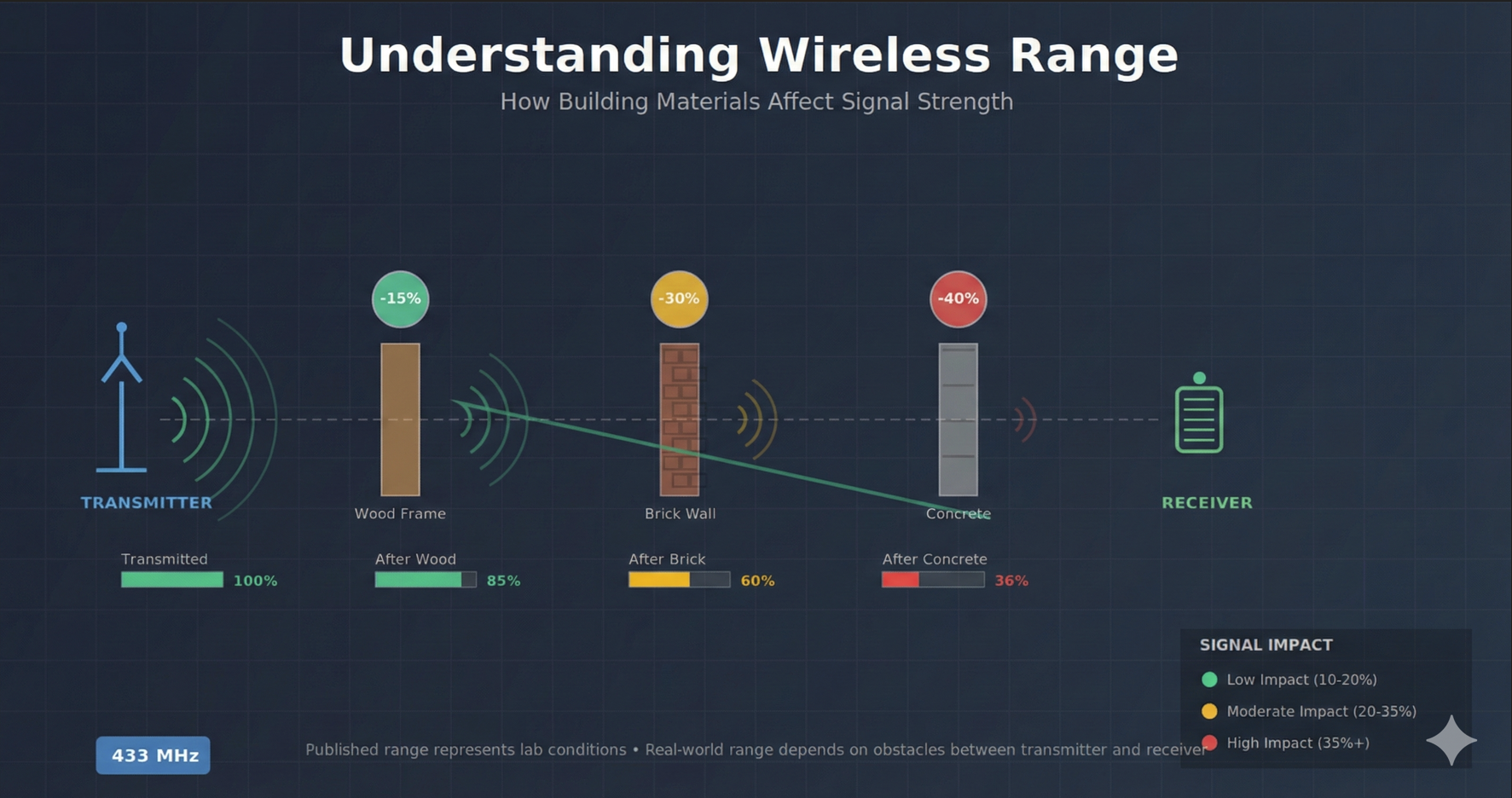
The materials that make up your home or building have the most significant impact on signal strength. Every wall, floor, and exterior surface between the transmitter and receiver acts as a barrier that absorbs or reflects part of the radio signal.
Signal Reduction by Material Type
| Material | Signal Reduction | Impact Level |
| Interior Drywall (per wall) | 10-15% | Low |
| Wood Siding / Wood Frame | 15-20% | Low |
| Vinyl Siding | 10-15% | Low |
| Stucco Exterior | 20-25% | Moderate |
| Brick Exterior | 25-35% | Moderate |
| Cinder Block / Concrete Block | 30-40% | High |
| Poured Concrete | 35-50% | High |
| Metal Siding / Metal Building | 40-60% | High |
| Metal Roofing (signal passing through) | 50-70% | Very High |
| Radiant Barrier / Foil Insulation | 60-80% | Very High |
| Low-E / Energy-Efficient Windows | 30-50% | High |
Environmental Factors
Beyond building materials, several environmental factors can affect your wireless range:
- Trees and Dense Vegetation: Foliage absorbs radio signals, especially when wet. A heavily wooded area between transmitter and receiver can reduce range by 20-40%.
- Terrain and Elevation: Hills, berms, or slopes between the transmitter and receiver can block or reflect signals. Line-of-sight is always best.
- Weather Conditions: Heavy rain, snow, or high humidity can temporarily reduce range by 10-20%. Temperature extremes can also affect battery performance in outdoor transmitters.
- Electronic Interference: Other wireless devices, LED lighting, motors, and electronic equipment can create interference that affects signal quality.
- Distance from Ground: Signals traveling close to the ground experience more attenuation than elevated signals. Mounting transmitters and receivers higher often improves range.
Estimating Your Actual Working Range
While every installation is unique, you can estimate your working range by accounting for the obstacles in your specific environment. Here’s a practical approach:
- Start with the published range. For example, 5,000 feet for the Dakota Alert DCPA-4000.
- Identify all obstacles between where you’ll place the transmitter and receiver.
- Apply reduction percentages for each obstacle using the table above.
- Add a safety margin of 20-30% for environmental factors and signal variations.
Real-World Example
Let’s say you’re installing a driveway alarm with a published range of 5,000 feet. The signal must travel from your driveway, through dense trees (25% reduction), through your brick exterior wall (30% reduction), and through one interior wall to reach the receiver (10% reduction).
Calculation:
Starting range: 5,000 feet
After trees (25% reduction): 3,750 feet
After brick wall (30% reduction): 2,625 feet
After interior wall (10% reduction): 2,363 feet
With 25% safety margin: ~1,770 feet effective range
In this example, a product rated for 5,000 feet would reliably work at distances up to approximately 1,700-1,800 feet. This is still excellent range for most residential applications, where driveways are typically 100-500 feet from the home.
Tips for Maximizing Your Wireless Range
- Position receivers near windows when possible. Standard glass causes minimal signal loss compared to walls.
- Mount transmitters and receivers at elevation rather than at ground level. Even 4-6 feet of elevation can improve range.
- Avoid placing receivers near electronic equipment, especially computers, routers, microwaves, or large motors.
- Keep fresh batteries in transmitters. Weak batteries reduce transmission power and range.
- Consider a product with higher published range if you have many obstacles or need maximum distance.
- For metal buildings or heavily reinforced structures, consider placing the receiver in an outbuilding or using a relay/repeater if available for your product.
When to Choose a Higher-Range Product
indicates your required distance exceedsIf your calculation suggests your required distance is more than 50% of the product’s published range after accounting for obstacles, we recommend choosing a product with a higher published range to ensure reliable operation.
For challenging installations—such as metal buildings, heavily wooded properties, or very long distances—contact us for personalized recommendations. Our team can help you select the right product for your specific situation.
Questions? We’re Here to Help
If you’re unsure which product will work best for your installation, please don’t hesitate to contact us. We’re happy to discuss your specific setup and recommend the best solution for your needs.
Phone: 1-800-DOORBELL (1-800-366-7235)
Email: support@1800doorbell.com