
My ERA-DSTX Detection Range Dropped From 25 Feet to 15
Nine times out of ten nothing has failed. A PIR sensor’s usable range is a moving number set by battery voltage, thermal contrast against the background, and the angle at which the target crosses the beam pattern — none of which show up on a thermometer or a tape measure. Work the checks below in order. Most cases resolve at step 1 or step 3.
On This Page
- The Scenario
- Before You Change Anything: Three Things That Fake a Range Loss
- The Eight-Step Diagnosis
- Step 1 — Fit a Brand-New Alkaline Battery
- Step 2 — Turn the LED Jumper On
- Step 3 — Move Reset to the Short Setting
- Step 4 — Run a Controlled Test Walk
- Step 5 — Read the Lens
- Step 6 — Check Aim and Rigidity
- Step 7 — Check the Background, Not the Air
- Step 8 — Now Change Range and Filter
- If the LED Lights But the Receiver Stays Silent
- Rules of Thumb for What to Expect
- When It Really Is the Unit
- What to Send Us If You’re Still Stuck
- Related Articles
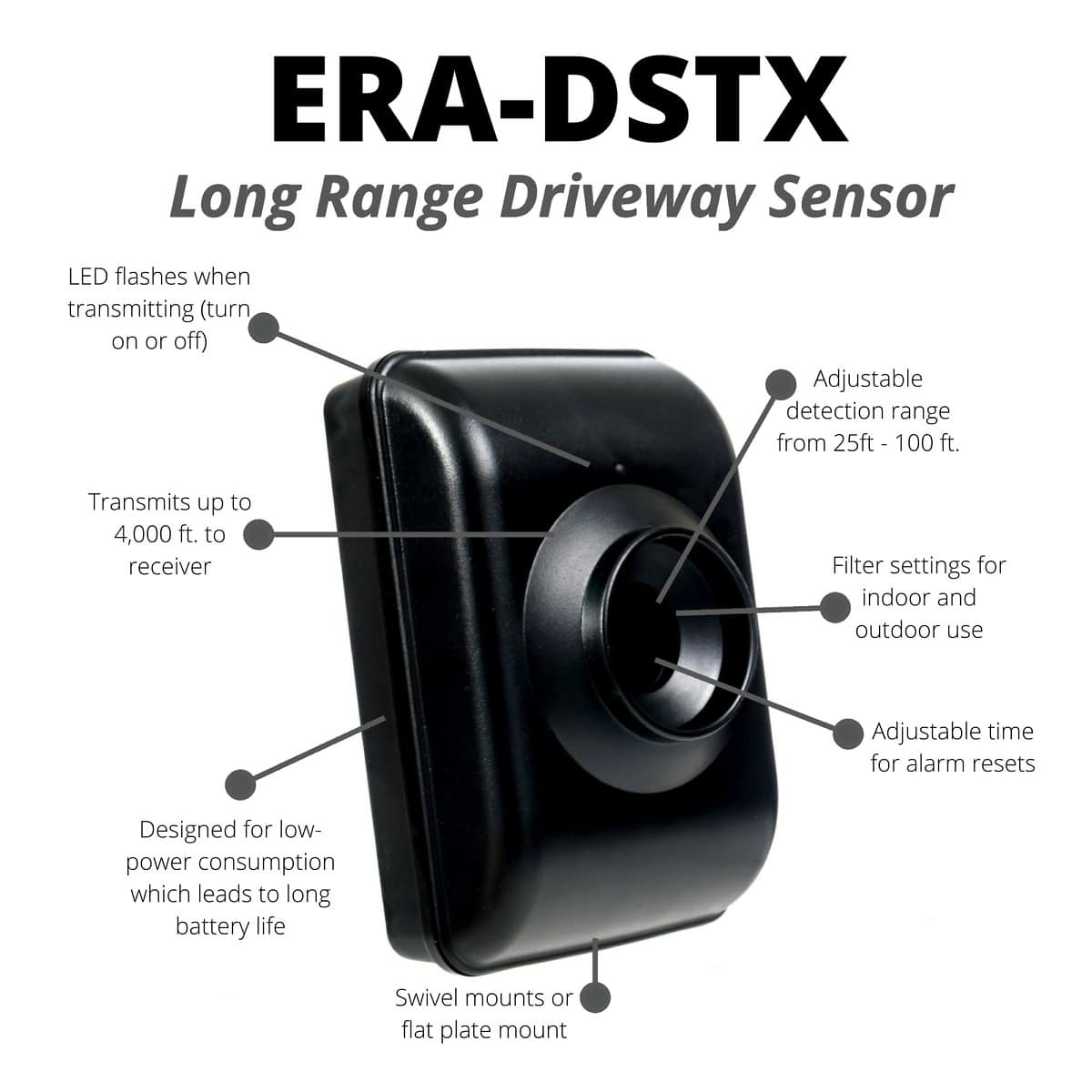
Applies to the ERA-DSTX driveway sensor/transmitter and the kits built around it — the ERA-DSDCR and the ERA-DSRXPG.
This is the field walkthrough. For the underlying explanation of how the sensor sees and what each setting really does, read How far will my ERA-DSTX driveway sensor really reach? first — it’s the companion to this article.
The Scenario
“It detected a person walking at about 25 feet when I installed it. Now it’s closer to 15. Same location, same mounting height, same light, same temperature, same humidity — nothing moved.”
This is one of the most common tickets we see on the ERA-DSTX, and the observation is almost always accurate: the range really did shrink. What has usually not happened is a hardware failure.
The reason is that a passive infrared sensor doesn’t measure distance. It measures the temperature difference between a moving target and the background behind it, and it only registers that difference when the target crosses from one of the lens’s narrow detection beams into the next. Every variable that feeds those two conditions — battery voltage, background surface temperature, walking angle, lens clarity, mounting angle — is invisible from where you’re standing. Any one of them can move 10 feet of range without a single visible change at the install site.
Before You Change Anything: Three Things That Fake a Range Loss
These aren’t real range losses, but they look exactly like one. Rule them out first, because if you skip them you’ll spend an afternoon “fixing” a sensor that was never broken.
- The Reset lockout. The Reset jumper sets a mandatory quiet period after every trigger — typically around 10 seconds on the short setting, around 2 minutes on the long one. If you’re on the long setting and you walk the driveway three times in a row to test, only the first pass will alert. The second and third land inside the lockout, and the unit looks dead, intermittent, or short-ranged. This is the single most common source of misleading test results.
- A battery that still “works.” A 9V alkaline that has dropped to 7.5 volts will still power the board, still blink the LED, and still transmit. What it won’t do is give the amplifier the headroom it needs to qualify weak, distant signals. The unit doesn’t fail — it just quietly stops reaching. This is the number-one cause of genuine range loss over time.
- Testing by walking toward the sensor. The lens fans the field of view into narrow beams with blind gaps between them. Walking across the fan cuts beam after beam and produces a strong signal; walking at the sensor keeps you inside one beam almost the whole way and produces almost nothing until you’re close. If your original test was a crossing walk and your new test is a head-on walk, you will measure a dramatically shorter range from an identical sensor.
The Eight-Step Diagnosis
Work these in order. Each step is cheap, and the order is by likelihood.
Step 1 — Fit a Brand-New Alkaline Battery
Not a partly used one, not a tested-good one, not carbon-zinc, and not a rechargeable 8.4V NiMH. A fresh name-brand 9V alkaline, or a 9V lithium if you’re in a cold climate.
What it tells you: if range comes back, you’re done — and you’ve learned your replacement interval. Battery-driven range loss is gradual, which is exactly why it reads as “nothing changed.”
Step 2 — Turn the LED Jumper On
The LED lights whenever the sensor transmits. Leave it on for the whole diagnosis. This splits the problem cleanly in two:
- LED lights, receiver stays quiet — the sensor detected fine. You have a wireless problem, not a detection problem. Skip to the radio section below.
- No LED at all — the sensor never detected. Continue with step 3.
Step 3 — Move Reset to the Short Setting
Remove the battery, move the Reset jumper to the short position, reinstall the battery, and wait 60 seconds for the sensor to thermally stabilize.
What it tells you: it makes the rest of the diagnosis trustworthy. You cannot measure range reliably on the long Reset setting.
Step 4 — Run a Controlled Test Walk
Every subsequent step is judged against this test, so run it the same way each time:
- Walk a path perpendicular to the sensor — across the detection fan, not toward it.
- Walk at a normal pace. Creeping produces signal changes too gradual for the amplifier to see.
- Start at 10 feet, confirm detection, then step out to 20, then 25, then 30.
- Wait at least 15 seconds between passes so the lockout clears.
- Note the distance at which detection becomes unreliable. That’s your honest current range.
What it tells you: a repeatable number to compare against after each change. Without it you’re guessing.
Step 5 — Read the Lens
Look closely at the white plastic window, then open the case and look inside too.
Dust, pollen, road film, a water film, a spiderweb strung across the front, or a wasp or spider nesting inside all scatter incoming infrared and cut range. This is a slow accumulation, which is precisely why it produces the “nothing changed” complaint.
Wipe it with a soft damp cloth only. Do not use alcohol, glass cleaner, or any solvent — they permanently haze polyethylene, and that range never comes back.
Step 6 — Check Aim and Rigidity
- Is the lens still level? A couple of degrees of downward tilt at 30 feet drops the whole beam pattern into the ground. Posts settle, swivel mounts loosen, brackets rotate.
- Is the arrow on the bracket still facing up, with the LED toward the top of the case? Upside-down, the unit still powers on but the beam pattern is inverted.
- Does the housing move in wind? A sensor that sways sweeps its own beams across a stationary background — that produces false triggers, and it can also desensitize the unit through repeated lockouts.
- Is it still mounted 3–4 feet off the ground? That’s the height that puts the beam fan at torso level across the whole distance.
Step 7 — Check the Background, Not the Air
This is the step people skip, and it’s the one that explains most “identical conditions” cases.
The sensor doesn’t care what the thermometer says. It cares about the temperature of the surfaces behind the person you’re trying to detect. On a sunny afternoon, asphalt, dark gravel, brick, and metal reach 130–150°F while the air reads 85°F. A person in front of that background has negative contrast and can be nearly invisible. On a clear night the same surfaces radiate heat away and run colder than the air.
Ask:
- Is the walking path now silhouetted against sun-warmed pavement instead of grass or shrubs?
- Has foliage been cut back, exposing hot ground that used to be shaded?
- Is there a new heat source in the field of view — a vehicle parked in a new spot, an A/C condenser, a relocated light fixture, a dryer vent?
- Are you testing at a different time of day than when you installed it?
- Is the person wearing a jacket? A coat’s outer surface sits near ambient; a T-shirt radiates near skin temperature. Same person, very different signal.
- Is it simply a hotter season? Detection range is genuinely longest in cold weather and shortest in hot. Expect the worst performance on a 90–95°F afternoon, when a person’s radiating surface and the background are nearly the same temperature.
What it tells you: if range returns at 7 a.m. but not at 3 p.m., nothing is wrong with the sensor. You’ve found your envelope, and step 8 is how you widen it.
Step 8 — Now Change Range and Filter
Only after steps 1–7. Changing settings first hides the real cause.
- Range to Medium (50 ft). If you’re chasing reliable detection at 25–30 feet on the Low (25 ft) setting, you’re asking for 100% of the rating. Plan on reliable detection at roughly half to two-thirds of whatever Range you’ve selected. Medium is the correct setting for a 25–30 foot target.
- Filter to Off. Filter On requires two qualifying pulses inside a short timing window before the unit will alarm; Off triggers on one. On is the manufacturer’s outdoor recommendation because it suppresses wind, birds, and sun flicker — but it costs you both range and fast-target detection. If you’re missing detections you care about, turn it Off and accept a few more false alerts.
What it tells you: Medium plus Filter Off is the standard high-sensitivity configuration. If that doesn’t reach 25–30 feet on a cool morning with a fresh battery and a clean lens, you have a genuine problem worth escalating.
If the LED Lights But the Receiver Stays Silent
That’s a radio problem, and it has nothing to do with detection range. The wireless link is rated to 4,000 feet line of sight, but that number assumes clear air.
- Move the transmitter off any metal — metal siding, a metal post, a metal gate frame. Metal detunes the 433 MHz transmitter badly. Wood, plastic, and trees are all better.
- Move the receiver away from other electronics, especially routers, cordless phone bases, and anything with a switching power supply.
- Run a temporary short-range test — carry the receiver out to within 50 feet of the sensor. If it chimes reliably there, the link is the problem, not the sensor.
- Remember there’s no limit to the number of receivers a single transmitter can drive, so adding a second receiver closer to the sensor is a legitimate fix.
Rules of Thumb for What to Expect
These are directional, not specifications, but they set realistic expectations.
- Crossing the pattern vs. walking at the sensor Crossing is dramatically better; head-on can halve it
- Cool morning (50–65°F) vs. hot afternoon (90–95°F)Cool is substantially longer; hot is the worst case
- Grass or shrub backdrop vs. sun-baked pavementVegetated backdrop is materially better
- T-shirt vs. heavy winter coatT-shirt gives a stronger signature
- Fresh alkaline vs. a battery near end of lifeFresh is materially longer
- Filter Off vs. Filter OnOff reaches further and catches fast targets
- Range Medium vs. Range Low, for a 25–30 ft targetMedium is the correct choice
- Warm car just driven vs. a car that sat overnightWarm car is far easier to detect
When It Really Is the Unit
Escalate if all of the following are true:
- Brand-new alkaline battery installed, 60-second warm-up allowed
- LED jumper on, and the LED does not light
- Reset on the short setting
- Filter Off, Range Medium or High
- Lens visually clean, nothing nesting inside the housing
- Lens level, bracket arrow up, LED toward the top of the case
- Someone walks across the pattern at 10 feet on a cool morning — and the LED still doesn’t fire
A sensor that won’t see a crossing target at 10 feet under those conditions is not a placement problem. Contact us — the ERA-DSTX carries a one-year warranty against defects in material and workmanship.
What to Send Us If You’re Still Stuck
Copy this and fill it in. These answers resolve the great majority of cases on the first reply.
Model:                    ERA-DSTX (or kit: ERA-DSDCR / ERA-DSRXPG)
Mounting height:          ___ ft off the ground
Distance sensor to path:  ___ ft
Range jumper:             Low / Medium / High
Filter jumper:            On / Off
Reset jumper:             Short / Long
Battery:                  age and type (alkaline / lithium / rechargeable)
Does the LED light when you walk past?          Yes / No
Detection distance, crossing walk:              ___ ft
Time of day and rough temperature when tested:  ___
What's behind the walking path?   grass / pavement / gravel / other
Related Articles
- How far will my ERA-DSTX driveway sensor really reach? — how the lens and pyroelectric element work, what each jumper actually does, and the full optimal-conditions checklist.
- My ERA-DSTX outdoor driveway motion sensor is not picking up cars — the vehicle-specific version of this problem.
More in ERA Product FAQ
Browse the full FAQ category or continue with related answers from the same FAQ category.