Is the ERA-DCKIT Wireless Doorbell ADA Compliant?
Is the ERA-DCKIT Wireless Doorbell ADA Compliant? gives you the key points, common questions, and the next place to look if you need more detail.
On This Page
- What the ADA Requires for Doorbell Notification
- How the ERA-DCKIT Meets ADA Requirements
- A Note on Light Intensity (Candela Rating)
- Applicable Compliance Standards
- Recommended Applications
- Installation Guidance for Compliance
- Placement
- Multi-Room Coverage
- Unit Differentiation in Multi-Family Settings
- Shop the ERA-DCKIT System
- ERA-DCKIT Wireless Door Chime Kit
- ERA-RXPG Plug-In Door Chime Receiver
- Frequently Asked Questions
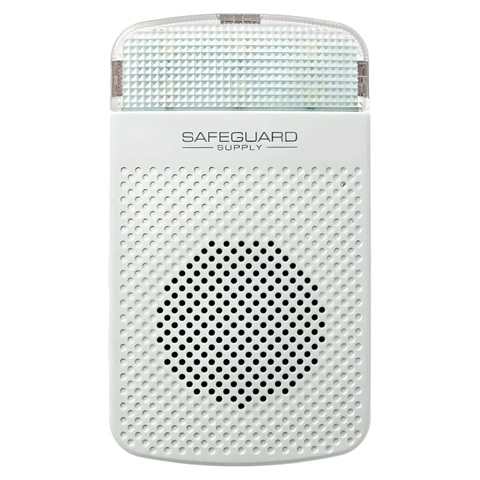
Overview: The ERA-DCKIT uses the ERA-RXPG visual receiver to deliver a defined 2 Hz flashing alert, room-to-room expandability, and plug-in deployment that makes it suitable for accessible residential doorbell notification when the system is specified and installed for the dwelling layout.
What the ADA Requires for Doorbell Notification
The Americans with Disabilities Act, along with ICC A117.1 (Accessible and Usable Buildings and Facilities) and the Fair Housing Act, requires that accessible dwelling units provide visual notification for doorbell/visitor alerts so that residents who are deaf or hard of hearing receive equivalent notification to audible-only systems.
For residential doorbell applications, the key requirements center on flash rate and visibility from primary living areas. Unlike fire alarm strobe requirements (which mandate a minimum 75 candela output), residential doorbell standards focus on perceptibility — the signal must be visible from the bedroom, living room, and kitchen.
How the ERA-DCKIT Meets ADA Requirements
Below is a full breakdown of the ERA-DCKIT‘s technical specifications compared to applicable ADA and ICC A117.1 doorbell requirements:
| Specification | ERA-DCKIT / ERA-RXPG Value | ADA / ICC Requirement |
|---|---|---|
| Flash Rate | 2 Hz (2 flashes/second) ✓ Meets | 1–3 Hz |
| Flash Duration | 250ms per flash; 10 seconds total per activation | Perceptible duration required |
| Light Color | Clear / White LED | No color restriction for doorbells |
| Light Intensity (Candela) | ~15.3–15.7 cd at 1 meter | No minimum cd specified for doorbells* |
| Viewing Angle | 180° horizontal coverage ✓ Meets | Visible from primary living areas |
| Maximum Visibility Range | Clearly visible up to 70 meters | Room-level visibility required |
| Operation Modes | Strobe-only, Audible-only, or Combined | Visual mode required for accessible units |
| Receivers per Push Button | Unlimited | All primary rooms must be covered |
* ADA and ICC A117.1 do not specify a minimum candela rating for residential doorbell strobes (unlike fire alarm strobes which require 75 cd minimum). See the section below for full candela testing details.
A Note on Light Intensity (Candela Rating)
Customers sometimes ask whether the ERA-RXPG receiver is “bright enough” for ADA compliance. Here is what the manufacturer’s testing shows and why it matters:
Candela Testing Methodology
The ERA-RXPG was tested in a controlled dark-room environment at exactly 1 meter using a calibrated light meter. Recorded readings were 15.30 to 15.70 lux.
At a distance of 1 meter, the formula simplifies directly, so those lux readings correspond to approximately 15.3 to 15.7 candela.
- Fire alarm strobes: ADA fire alarm strobes typically require 75 candela minimum.
- Residential doorbell visual alerts: the governing residential accessibility standards focus on perceptibility from primary living areas, not a fixed minimum candela floor.
- Why this matters here: the ERA-RXPG pairs that light output with a 180-degree viewing angle, approximately 70-meter visibility range, and a 2 Hz flash rate intended for normal residential room conditions.
Applicable Compliance Standards
The ERA-DCKIT is designed to assist in meeting doorbell notification requirements under the following standards:
- Americans with Disabilities Act (ADA) Standards for Accessible Design
- ICC A117.1 — Accessible and Usable Buildings and Facilities
- Fair Housing Act accessibility guidelines for dwelling units
- FCC-Certified for wireless radio frequency operation
- UL-Listed for electrical safety
Recommended Applications
- Accessible dwelling units in apartments and condominiums
- Assisted living and senior housing facilities
- Multi-family housing requiring Fair Housing Act compliance
- New construction and retrofit accessibility projects
- Any residential setting requiring visual doorbell notification for deaf or hard-of-hearing residents
Installation Guidance for Compliance
Correct placement of the ERA-RXPG receiver is critical to achieving ADA compliance.
Placement
Plug the ERA-RXPG into a standard wall outlet in a central location visible from the primary living areas. Aim for a clear line of sight to the bedroom, living room, and kitchen wherever the layout allows.
Multi-Room Coverage
For units larger than 600 sq ft or multi-room layouts, add one receiver per room. The system supports unlimited receivers, so there is no ceiling on how many you can deploy from a single push button.
Unit Differentiation in Multi-Family Settings
The ERA-DCKIT includes 12 unique chime melodies, allowing property managers to assign a different tone to each unit so residents can distinguish their own doorbell notification from a neighbor’s.
Shop the ERA-DCKIT System
The ERA-DCKIT is available as a complete kit. Additional or replacement ERA-RXPG receivers are available separately for multi-room coverage:
ERA-DCKIT Wireless Door Chime Kit
Includes push button transmitter and ERA-RXPG plug-in receiver. Guaranteed to work in your location. View ERA-DCKIT →ERA-RXPG Plug-In Door Chime Receiver
4,000 ft range plug-in receiver. Add multiple units for full-room coverage in larger accessible dwelling units. View ERA-RXPG →Frequently Asked Questions
More in ERA Product FAQ
Browse the full FAQ category or continue with related answers from the same FAQ category.