
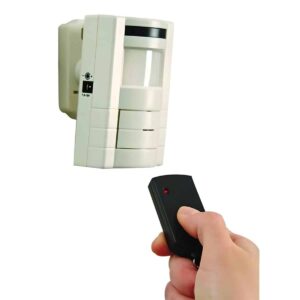
HS4370D User Manual
Setup, pairing, and troubleshooting for the HS4370D Simple to Use Motion Sensor Entrance Alert w/ Remote Key fob.
INSTRUCTION GUIDE Remote Control/Adjustable Motion Alarm HS4370D Congratulations on a wise purchase!
ENCLOSED YOU WILL FIND
- Remote Control/Adjustable Motion Alarm
- Mounting bracket
- Remote control
- Two 1.5 volt batteries (installed)
- Wall anchors
- Screws
TOOLS/SUPPLIES NEEDED
- Small flat head screwdriver
- Small Phillips head screwdriver
- Ballpoint pen
- 7/32" drill bit
BATTERIES NEEDED (not included)
- Three alkaline "AA" batteries
The remote control motion alarm and chime can be used as a portable alarm or can be wall mounted where the adjustable PIR (passive infrared) sensor will detect movement over an area of 30 feet by 110 degrees. It can be armed/disarmed with the enclosed infrared remote control unit. The chime feature can be used to announce visitors at the entrance of the home or office.
OPERATION
Remove the back of the unit by unscrewing the screw located at the top of the locked battery compartment and slide down. Insert three AA alkaline batteries (not included) into the compartment located in the back of the unit. Alternatively, a 7.5-15 volt adapter (not included) can be connected to the jack socket located at the side of the unit. The unit is also equipped with terminals for use with magnetic contacts. Magnetic contacts can be purchased separately.
Batteries are included in your remote control. When batteries run low, replace them with two 1.5 volt type button cell batteries. Simply open remote control by removing screws and replace batteries.
INSTALLATION
Featuring an adjustable mounting bracket, the alarm is designed to be mounted or set anywhere in a room at a height of 2 to 10 feet from the ground. When mounting to a wall, use the mounting bracket which is included and align the unit in position using the screws provided. Motion is detected in a 30 degree range. The adjustable mounting bracket can be angled within a 30 degree vertical detection zone and 120 degree horizontal detection zone. To mount the bracket, simply align screws to the mounting bracket and affix to wall using screws and wall anchors.
ARMING/DISARMING THE ALARM
The unit is armed/disarmed by use of the infrared remote control (additional units sold separately) which operates up to a distance of 25 feet from the alarm. Simply point the remote control at the alarm, press once and release. The alarm must be set to the "alarm" position.
The alarm will "beep" once to indicate that it has been activated and the green LED will light up for approximately 30 seconds to allow exit from the detection zone. The flashing red LED indicates that motion is being detected. The 30 second delay only starts after no motion has been detected for 30 seconds. The alarm will give another beep when the green light turns off indicating that the unit is now armed.
To disarm the unit, simply press the button on the remote control. The unit will beep twice indicating that the alarm is in the "off" mode. The unit will now be switched off. When entering the alarm zone, approximately 10 seconds are given to deactivate the unit before the alarm sounds. Remember to allow for this 10 second delay when testing the alarm.
To announce visitors at an entrance of a home or business, switch the function to the "chime" position. **Note:** Unit must be armed in order for chime to activate. If armed in the chime mode, the unit will only sound the chime. When switching the alarm from alarm to chime position, the alarm must be disarmed.
If the green light is flashing upon your return, there has been an intrusion. The alarm has been set off, and it has reset itself.
THE ALARM
The alarm is activated by the PIR sensor. After a 10-15 second delay, the 110dB high frequency siren will automatically sound once the sensor has detected movement. It will remain on for approximately one minute if no further movement is detected. It will then automatically shut off and reset itself. This will cause the green light to flash and it will continue flashing until the unit is turned off to indicate that an intrusion has occurred.
LOW BATTERY INDICATOR
When the alarm batteries are running low, the bright red LED on the front of the unit will flash. The alarm will also beep every 20 seconds as a warning that the batteries need to be replaced.
IMPORTANT
The Remote Control Motion Alarm is a sensitive electronic product and the following precautions should be followed.
- Do not drop the unit.
- Do not place the unit close to a source of direct heat.
- Do not use different types of batteries or mix old and new ones.
- Do not use rechargeable batteries.
- The use of Alkaline batteries is recommended. For interior use only.
- **As with most motion detection devices, pets may activate your unit.**
LIMITED WARRANTY
The product you have purchased is guaranteed against defects in workmanship and materials for the period stated on the package. Warranties implied by law are subject to the same time period limitation. Some states do not allow limitations on how long an implied warranty lasts, so this time limitation may not apply to you.
If the product fails due to a manufacturing defect during normal use, return the product and dated sales receipt to the store where purchased for replacement OR send the product and the dated sales receipt to: Lamson & Sessions 25701 Science Park Drive Cleveland, OH 44122 USA Attn: LHP Customer Service
Not Covered
- Batteries, light bulbs, and other expendable items are not covered by this warranty. Repair service, adjustment and calibration due to misuse, abuse or negligence are not covered by this warranty. Unauthorized service or modification of the product or of any furnished components will void this warranty in its entirety. This warranty does not include reimbursement for inconvenience, installation, set-up time, loss of use, postage, unauthorized service, or other products used in conjunction with, but are not supplied by, Lamson & Sessions.
All requests for replacement must include a **dated sales receipt** (copies accepted). LAMSON & SESSIONS IS NOT LIABLE FOR LOST PROFITS, INDIRECT, SPECIAL, EXEMPLARY, INCIDENTAL OR CONSEQUENTIAL DAMAGES INCLUDING WITHOUT LIMITATION ANY SUCH DAMAGES DUE TO IMPROPER WIRING OR MISUSE OF THE PRODUCT. As some states do not allow the exclusion or limitation of incidental or consequential damages, the above limitation and exclusion may not apply to you.
ALSO AVAILABLE FROM CARLON
- Extend-A-Chime® – lets you hear your existing wired doorbell in remote areas of your home or yard
- Plug-in and Battery Doorbells and Chimes
- On/Off Remote Switches
- Touch and Automatic Lighting Controls
This warranty gives you specific legal rights, and you may also have other rights which vary from state to state.
U.S. Patent Des.: #381,283
Carlon® 25701 Science Park Drive Cleveland, OH 44122 www.lamson-sessions.com
Made in China ©2004 LAMSON & SESSIONS
0406 IS115