
Product manual
RC3510D User Manual
Setup, pairing, and troubleshooting for the RC3510D Carlon Outdoor Rated Weatherproof Battery Doorbell.
INSTRUCTION GUIDE Battery Door Chime RC3410/RC3510D/RC3513D/RC3520/ RC3610/RC3624/RC3676 Congratulations on a wise purchase!
What's Included
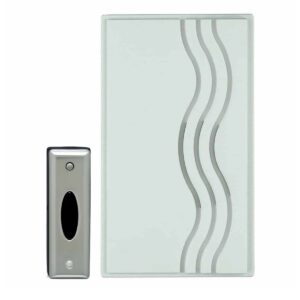
- Chime Receiver
- Chime Button
- Two 3-Volt lithium batteries (installed)
- Double-sided tape
- Screws
- Wall anchor
- Plastic film (For RC3510D/RC3513D only) TOOLS/SUPPLIES NEEDED:
- Small flat head screwdriver
- Small Phillips head screwdriver
- Ballpoint pen
- 7/32" drill bit (if mounting Receiver with wall anchors) BATTERIES NEEDED (not included):
- 4 alkaline "C" batteries MOUNTING BACK COVER OF BUTTON Transmitter Note: Mounting Button on aluminum siding or button metal door frame may reduce range. If button must be mounted on metal, try placing a 1/2’’ piece of wood between the button and the metal. If you want to cover the wire hole from your existing button, save mounting of the new Button until after removing the existing button. 1. Remove cover from back of Button by inserting ball- Back point pen into round hole at bottom of transmitter cover and gently pushing in on tab. Lift Button cover away from the back plate. 2.
Mounting
- A) Make sure surfaces are free of dust, oil, and
- other substances that could affect adhesion.
- B) Attach double-sided tape to Button back
- cover.
- C) Making sure that the end with the hook-shaped latch is facing down, press
- GUIDE D’INSTALLATION
- Carillon à piles RC3410/RC3510D/RC3513D/RC3520/RC3610/RC3624/RC3676
Nous vous félicitons de votre choix judicieux! VOUS TROUVEREZ DANS CET ENSEMBLE :
- Un récepteur de carillon
- Un bouton de carillon
- Deux piles au lithium 3 volts (installées)
- Un ruban