
BALERT-S User Manual
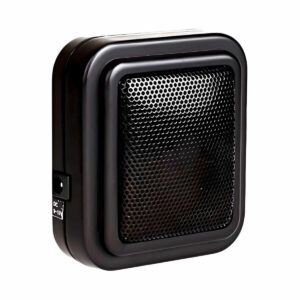
Setup, pairing, and troubleshooting for the BALERT-S Enforcer E-931ACC-SQ Additional Speaker Photo Beam Entry Alert Kit.
Specifications
- Model Number E-931CS22RRCQ
- Type Retro-Reflective Photoelectric Entry Alert System
- Sensing Range 22' (7 m)
- Voltage Supply Sensor: 9-15 VDC, Chime: 9-15 VDC
- Total Current Consumption 100mA Max.
- Stand-by Current 30mA
- Light Source IR LED
- Ambient Temperature -40F (-200C) ~ 1220F (500C)
- Speaker Response Time ~1 sec. for Chime, 30 sec. for Alarm
- Speaker Volume Adjustable from 0 ~ 90 dB at 1m (max.)
- Alarm Time Range Adjustable 3~30sec. for alarm
- Speaker Output Chime / Off /Alarm (Select by switch)
- Mounting Brackets All Included
Troubleshooting
Trouble Possible Origin(s) Remedy(s) Sensor does not detect the object. Sensor not aligned properly. Change the angle of the sensor or reflector.
Red LED does not turn on. 1) Reflector and/or sensor is misaligned. 1) Adjust the reflector and/or sensor for 2) No power. proper alignment 2) Check power adapter and cable. 13/ " 8
Dimensions
7
- 2 /16" (62mm) (35mm)
- 13/16" (30mm)
- 23/ " (60mm)
- 8
- " (71mm)
/16 132 " (71mm) /16 132
- 21/ " (51.3mm) 5/ " (8.2mm)
- 64 16
- " (51.3mm) " (51.3mm)
- " (60.3mm) /64 " (60.3mm) /64
/64 1 /64 12 25 2 2 252 NOTICE: The information and specifications printed in this manual are current at the time of publication. However, the SECO-LARM policy is one of continual development and improvement. For this reason, SECO-LARM reserves the right to change
Specifications
without notice. SECO-LARM is also not responsible for misprints or typographical errors. Copyright © 2014 SECO-LARM U.S.A., Inc.
All rights reserved. This material may not be reproduced or copied, in whole or in part, without the written permission of SECO-LARM.
Warranty
ENFORCER Photobeam Sensors are warranted against defects in material and workmanship while used in normal service for a period of one (1) year from the date of sale to the original customer. Our obligation is limited to the repair or replacement of any defective part if the unit is returned, transportation pre-paid, to SECO-LARM. ® SECO-LARM U.S.A., Inc., 16842 Millikan Avenue, Irvine, CA 92606 Tel: 800-662-0800 / 949-261-2999 ® Fax: 949-261-7326 Website: www.seco-larm.com E-mail: sales@seco-larm.com PITSW3 MiE931CS22RRCQ_1409.pmd ® ENFORCER Sensor
- Retro-Reflective Photoelectric
- Sensor Entry Alert System
- E-931CS22RRCQ
- Range: 22ft. (7m)
- INSTALLATION MANUAL
Features:
- Retro-reflective photoelectric sensor.
- All components plug into each other.
- Range: Up to 22 feet (7m). No hard wiring required.
- Perfect for monitoring an entrance, or for counting
- Optional counter available (E-931ACC-CQ). foot traffic with optional counter.
- Optional second speaker available (E-931ACC-SQ).
- Will make “ding-dong” sound or alarm sound
- Includes the following: when the beam is interrupted. — Retro-reflective photoelectric sensor.
- Speaker volume can be adjusted or turned off. — Reflector.
- When in alarm mode, sounding time is adjustable — Speaker/electronic chime. from 3 to 30 seconds. — Power adapter. Caution:
- This sensor was not designed to prevent bodily injury or loss of life.
- Use of this sensor in certain security applications may be regulated by local laws or codes. SECO-LARM is not responsible for compliance with such laws or codes. Included: EN FO RCE R ENFORCE R® ® E-931CS22SQ E-931ACC-R2Q E-931ACC-SQ E-931ACC-BLS4Q E-931ACC-BLR2Q Power Transmitter/Receiver Reflector Speaker/Electronic Chime Sensor Bracket Reflector bracket Adapter --- page break --- Optional Accessories: Mounting the Reflector: Sample Fixed Mounting: ENFORCER® E-931ACC-SQ E-931ACC-CQ E-931ACC-RC1Q E-931ACC-HR1Q E-931ACC-BLS8Q Speaker/Electronic Chime Digital Counter Round Reflector Reflector Hood for Door Frame Bracket (with 32ft wire) (with 32ft wire) 82 x 9 mm Round/Square Reflectors Mounting the Sensor: Sample Installations: Store front door Main Garage entrance door door ¤ ¤ ¤ ¤ ¤ ¤ ¤ ¤ ¤ ¤ ¤ ¤ ¤ ¤ ¤ ¤ ¤ ¤ ¤ ¤ ¤ ¤ ¤ ¤ ¤ ¤ ¤ ¤ ¤ ¤ ¤ ¤ e moc e W ¤¤¤¤¤¤¤¤¤¤ l ¤¤¤¤¤ ¤¤¤¤¤¤¤¤¤¤ ¤¤¤¤¤ Installation and Adjustment: Other possible applications: Offices, stores, schools, warehouse, vehicle detection, etc. LED Functions: Wiring: (one speaker, no counter) RED LED - When ON, it indicates the sensor is powered and aligned properly. Installation: 1. Mount the reflector and sensor so they face each other at about 2' off the ground or knee high. 2. Connect the sensor to the speaker. 3. Connect power adaptor to the speaker.
- For signalling in multiple rooms, add an optional second speaker (E-931ACC-SQ).
- Connect an optional counter (E-931ACC-CQ) to the speaker output (if desired). 4. To find the correct alignment, slowly adjust the Wiring: (with optional counter and second speaker) angles of the sensor and/or reflector up and down and right and left. Sensor Adaptor Speaker Speaker (optional) Counter (optional) NOTE:Correct alignment is reached when red LED Up to 22' (7m) turns ON. ¤¤¤¤¤¤¤¤¤ ¤¤¤¤¤ Set Speaker Mode: After the sensor and reflector have been properly Output installed, the next step is to set the speaker mode. ENFORCE R® ENFORCE R® 1. Choose between "Chime" or "Alarm" sound or "OFF". Reflector Input Input 2. If "Alarm" was chosen: Output A. Set speaker to Alarm NOTE: a) When adding a 2nd speaker. If the application distance between speakers exceed 33 ft. (10m), B. Adjust the alarm sounding time from 3 to 30 then a power adaptor is required for the 2nd speaker. b) When there are 2 devices added to the first speaker, such as a 2nd speaker & a counter. seconds. Then a second power adaptor is required for the 2nd speaker even when the distance is within 33 ft. (10m) C. Set speaker Volume. c) Speaker and counter uses a standard 1/8" stereo jacks. Mounting the Speaker/Electronic Chime: Sample Sample Fixed Bracket Mounting: Mounting: Adjusting the Speaker/Electronic Chime: Wall mount hole Bracket mounting holes Switch: Chime/ OFF/Alarm Switch Timer: 3~30 Sec. Volume:0 ~ max. 3. If "Chime" was chosen: Set speaker to Chime 4. If "OFF" was chosen: A. Set speaker to OFF B. The speaker will not sound when the beam is broken. Using the Optional Counter: 1. Automatically increases by "1" when sensor is triggered. 2. Manually add "1" by pressing "+". 3. Manually subtract "1" by pressing "-". 4. Reset counter by pressing "RESET." Testing: 1. Power up the sensor and speaker. The red LED should be ON. 2. Pass object to be detected between the sensor and reflector. The red LED should turn OFF and the speaker (if connected) should sound. Red LED ENFORCER®