
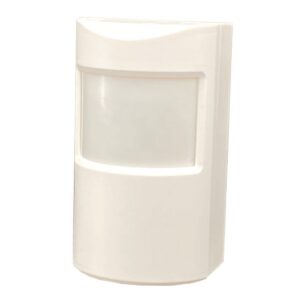
PIR-4000 User Manual
Setup, pairing, and troubleshooting for the Dakota Alert PIR-4000 Wireless Indoor Motion Sensor Alert.
TM
- Dakota Alert
- WIRELESS SECURITY EQUIPMENT
- Wireless PIR Sensor
- PIR-4000
- USER GUIDE
www.dakotaalert.com
--- page break ---
INTRODUCTION
- The PIR-4000 transmitter is compatible with all Dakota Alert 4000 series receiv-
- ers. The PIR-4000 is designed for indoor applications. When the sensor detects
- an object it will send a signal to a receiver which will sound one of the selected
tunes for few seconds.
What's Included
- PIR
- (1) CR123 A
- Swivel Mount
- Screws (2)
- User Guide SETTING UP YOU PIR-4000: 1. Adjust the PIR-4000 2. Install (1) CR-123 A battery (included) 3. Program the PIR-4000 to your receiver. 4. Mount your PIR-4000. 2 --- page break --- ADJUSTING MOTION DETECTOR SETTINGS To adjust your settings, move the jumpers inside the motion detector’s case to complete a circuit. 1. To open the case, locate the small tab on the bottom of the case and press with a small flat screwdriver while pulling the lens portion of INSERT FLAT SCREWDRIVER IN TAB the case away from the back portion of the case. BOTTOM VIEW OF CASE 2. Locate the set of jumpers in the bottom left hand corner of the circuit board. ( Refer to page 4 & 5 for settings) RESET LED FILTER 10S ON ON 120S OFF OFF 3 --- page break --- 3. Gently pull off the jumper for the setting you want to change. Note: If you can’t remove the jumper with your fingers, you can use a tweezer. 4. Gently push the jumper back onto the pair of jumper pins that corresponds with the setting you want. 4 --- page break --- JUMPER SETTINGS
- RESET: Changes the minimum time between alarm activations. RESET 10S (10 Seconds): 10S 10S Waits 10 seconds 10S before the alarm 120S 120S 120S activates again
- LED: Turns LEDs on or off LED ON: ON ON LED lights for 2 ON seconds when OFF OFF OFF motion is detected. 120S (120 Seconds): Waits 120 seconds before the alarm activates again OFF: Turns off LEDs : Changes the sensitivity level of the motion detector to filter out small movements like curtains moving. FILTER ON: ON ON ON For less OFF OFF OFF sensitivity 5 OFF: For more sensitivity --- page break --- INSTALLING THE BATTERY 1. Open the case by pressing the small tab at the bottom of the case with a small screwdriver. 2. Install a CR-123A battery in the PIR-4000. Be sure to observe the polarity (+/-) on the case. 3. Replace the cover 6 Battery Negative + Positive - --- page break --- CODING TO YOUR RECEIVER NOTE: You can connect up to 16 Dakota Alert 4000 Series transmitters to your receiver 1. Refer to the manual for you Dakota Alert 4000 Series receiver for complete coding instructions. 2. To activate the PIR-4000 either wave your hand over the sensor or press the test button Test Button 7 --- page break --- MOUNTING YOUR PIR-4000 NOTE: For maximum wireless range between the motion detector and receiver, avoid mounting the sensor on a metal object. Although the maximum wireless range is about one mile, obstruc- tions such as hills, trees, metal siding and stucco can reduce that range. 1. Select a location to mount the motion detector. For best results mount the sensor on a wall about 7’ off the ground and pointing down slightly at the area to be monitored. Avoid pointing towards things that might move such as curtains in the wind. 2. Use a drill and the included screws to mount the swivel bracket. 3. Slide the transmitter down onto the bracket. 8 --- page break --- DETECTION PATTERN
- To decrease the detection distance angle the sensor downward.
- To increase the detection distance angle the sensor upward.
- Test the detection pattern by walking back and forth in front of the sensor. Top View Side View Approximately 40 feet 9 --- page break ---
Specifications
- Power Source: CR-123A lithium battery
Dimensions
3.25” H X 2” W X 1.5” D
- Motion detection range: up to about 40’
- Operating Temperature: -10° to 120° F
Wireless Range
Up to 1 mile (1.6 km)*
- Operating Frequencies: 433 MHz *Actual range will vary depending on local terrain and obstructions. TECH SUPPORT If you have problems using this product after reading this manual, please contact us. You can reach us by phone at 605-356-2772 from 8:30 AM to 5:00 PM Monday through Friday (Central Standard Time). We will be happy to answer you questions and help you in any way we can.
Warranty
Dakota Alert warrants this product to be free of defects in materials and workmanship for a period of one year from the date of purchase. This warranty does not cover damage resulting from accident, abuse, act of God, or improper operation. If this product does become defective, simply return it to Dakota Alert.
Please include a note describing the troubles along with your name, address and phone number as well as the original sales receipt. If the product is covered under warranty it will be repaired or replaced at no charge. If it is not covered under warranty, you will be notified of any charges before work is done. 10
--- page break ---
LEGAL NOTICES This device complies with Part 15 of the FCC Rules. Operation is subject to the following two conditions: (1) this device may not cause harmful interference, and (2) the device must accept any interference received, including interference that may cause undesired operation. Changes or modifications not expressly ap- proved by the party responsible for compliance could void the users authority to operate the equipment.
This equipment has been tested and found to comply with the limits for a Class B digital device, pursuant to Part 15 of the FCC Rules. These limits are designed to provide reasonable protection against harmful interference in a residential installation. This equipment generates, uses and can radiate radio frequency energy and, if not installed and used in accordance with the instructions, may cause harmful interference to radio commu- nications.
However, there is no guarantee that interference will not occur in a particular installation. If this equipment does cause harmful interference to radio or television reception, which can be determined by turning the equipment off and on, the user is encouraged to try to correct the interference by one or more of the following measures:
- Reorient or relocate the receiving antenna.
- Increase the separation between the equipment and receiver.
- Connect the equipment into an outlet on a circuit different from that to which the receiver is connected.
- Consult the dealer or an experienced radio/TV technician for help. WARNING: Cancer and Reproductive Harm. Go to www.P65Warnings.ca.gov for more information. For additional accessories please visit www.dakotaalert.com 11 --- page break --- Dakota Alert, Inc. Phone: (605)356-2772 Fax: (605)356-3662 Address: 32556 477th Ave. PO Box 130 TM Dakota Alert WIRELESS SECURITY EQUIPMENT www.dakotaalert.com